


SAP Security: Controlling Critical Variables
What should I control? What are the critical variables in SAP security that I should monitor?
For executives and CISOs, a red alert is a first level to act upon. As we presented in the previous email, CentinelBox provides reports with color identification in cases where action is required… without the need for a deep understanding of the problem or its depth.
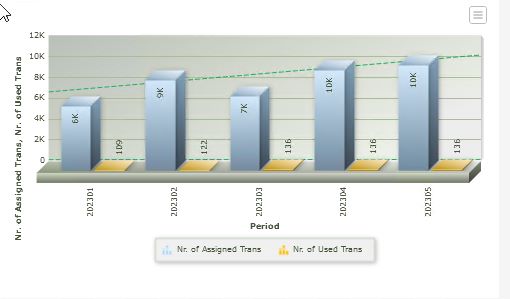
Along with these reports, graphical charts immediately show an indication of the security status:
Comparison between assigned and used transactions: a proper assignment should have a gap of 5 to 10% between the two values. Otherwise, there is a problem.
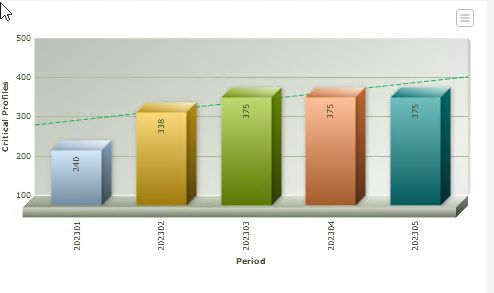
Critical variables:
User accounts with critical profile assigned: it should display zero!
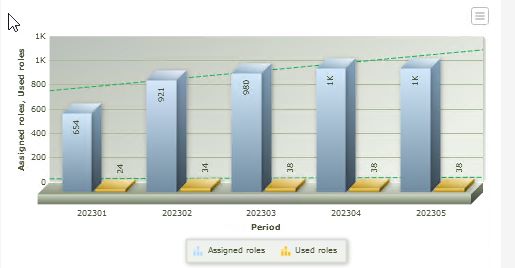
Comparison of assigned roles and used roles: both values should be similar with little variation (between 5 and 10%). Otherwise, we are in a scenario of role over-assignment, indicating privileges that users are not using.
Comparison of the number of conflicts related to segregation of duties between the quantity of assigned transactions and the transactions actually used. These values should be similar with little variation (between 5 and 10%). The primary cause could be attributed to role and transaction over-assignment, as presented in the previous charts.
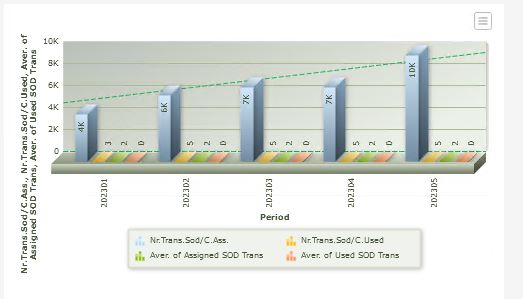
At a second level, your alarms for conflicting SOD (Segregation of Duties) functions and critical functions provide analysis and evaluation information for auditors.
Want to learn more about CentinelBox and how we can help you take control of your SAP Security?
Schedule a personalised demo directly with me so you can see how our platform enables assertive and successful internal control.
